Can’t Hire an SEO Expert? Here’s How to SEO Your Small Business Website Yourself
No SEO experience or big marketing budget? Improve your website’s visibility with simple DIY tips and free tools.
Yes, you can improve your website’s search visibility without hiring an SEO expert. Many of the changes that influence how Google ranks a page, such as fixing indexing issues, choosing the right keywords, and writing clearer content, do not require advanced technical knowledge. They do require time, patience, and a willingness to work through each page methodically.
This article gives UK small business owners a practical, step by step approach to improving website SEO without paying for a specialist straight away. Expect to spend a few hours a week over several months rather than fixing everything overnight. Each step builds on the last, starting with the most basic question of all: can Google actually find your website?
Table of Contents
- Step 1: Check Whether Google Can Find Your Website
- Step 2: Find the Keywords Your Customers Actually Use
- Step 3: Optimise Your Website Pages for Search Engines
- Step 4: Improve Your Website Content
- Step 5: Improve Website Speed and Mobile Usability
- Step 6: Improve Internal Linking and Website Navigation
- Step 7: Track Your SEO Progress
- Conclusion: DIY SEO Is a Starting Point, Not the Entire Strategy
- How Step Ahead Digital Can Help
- FAQ
Step 1: Check Whether Google Can Find Your Website
Before changing anything on your pages, confirm that Google can actually crawl and index them. A page that cannot be found cannot rank, no matter how well written it is.
Set up Google Search Console
Google Search Console is a free tool that shows how Google views your website. Once set up, use it to:
- Verify ownership of your domain.
- Submit an XML sitemap so Google knows which pages exist.
- Check the Page Indexing report to see which pages are indexed and which are not.
Identify indexing problems
The Page Indexing report often reveals issues that quietly limit visibility, including:
- Important pages excluded from search results.
- Incorrect noindex directives left over from a previous website build.
- Common crawling errors, such as broken links or server issues.
Practical takeaway: Confirm that every important page on your website, especially service and contact pages, is accessible and eligible for indexing before moving on to keyword work.
Step 2: Find the Keywords Your Customers Actually Use
Keyword research simply means understanding the words real customers type into Google when they need what you offer. If you are also reviewing your overall site structure, our guide on what pages a small business website should have is a useful companion to this step.
Start with your products and services
- List your main services or products in plain language.
- Think about the problems and questions customers have before they contact you.
- Add location specific phrases if you serve a particular town, city or region.
Use free keyword research methods
- Type a service into Google and note the autocomplete suggestions.
- Check the Queries report in Google Search Console for terms you already rank for.
- Use Google Keyword Planner to see approximate search volumes.
Practical takeaway: Select one primary search topic for each important website page rather than trying to target everything on every page.
Step 3: Optimise Your Website Pages for Search Engines
Once you know which keyword each page should focus on, update the on-page elements that help Google and visitors understand what the page is about.
Write descriptive SEO page titles
Each page title should clearly state the service and, where relevant, the location, rather than a vague label like “Services” or “Home”.
Create useful meta descriptions
A good meta description summarises the page in a way that encourages a click, without stuffing in keywords unnaturally.
Organise content using H1, H2 and H3 headings
Use one H1 per page for the main topic, then H2 and H3 headings to break the content into logical, scannable sections.
Improve URLs and internal links
Short, descriptive URLs and relevant internal links help both users and search engines understand how pages relate to one another. For more detail on this relationship, see our guide to web design structure and SEO.
Here is a simple before and after example for a small business service page:
| Element | Before | After |
| Page title | Services | Boiler Repairs in Leeds | Fast, Local Call-Outs |
| URL | /page2 | /boiler-repairs-leeds |
| H1 | Welcome | Boiler Repairs in Leeds |
| Meta description | None | Fast, reliable boiler repairs in Leeds. Same day call-outs available. Call now for a free quote. |
Practical takeaway: Fully optimise one important service page, title, meta description, headings and URL, before moving on to the next page.
Step 4: Improve Your Website Content
On-page elements only work well when the content behind them genuinely helps the reader.
Answer your customers’ most important questions
- Explain each service clearly, including what it involves and who it suits.
- Address common concerns, such as pricing, timeframes or guarantees.
- Add relevant examples, photos or evidence of previous work where appropriate.
Avoid thin, duplicated and keyword-stuffed content
Pages with only a sentence or two, or several pages that repeat the same wording, tend to confuse both readers and search engines. Our article on why a website might get traffic but no enquiries covers this in more detail.
Practical takeaway: Review each page and ask whether it genuinely answers what a prospective customer searching for that topic would want to know.
Step 5: Improve Website Speed and Mobile Usability
A slow or awkward mobile experience can discourage visitors before they ever read your content.
Test your website with PageSpeed Insights
Google’s free PageSpeed Insights tool highlights specific issues slowing down your pages on both desktop and mobile.
Compress oversized images
Large, uncompressed images are one of the most common causes of slow loading times and are usually simple to fix.
Check mobile navigation, text and buttons
Confirm that menus, text and buttons are easy to use on a small screen, since most visitors will arrive on a phone.
Technical performance supports a better user experience, but speed scores alone do not determine rankings. They work alongside relevant content and good keyword targeting, not instead of them.
Step 6: Improve Internal Linking and Website Navigation
- Link related service pages to one another where it genuinely helps the reader.
- Connect supporting blog articles to the service pages they relate to.
- Use descriptive anchor text rather than generic phrases like “click here”.
- Make sure important pages are reachable within a few clicks from the homepage.
Practical takeaway: Add a handful of useful, contextual links between relevant pages rather than linking every page to every other page.
Step 7: Track Your SEO Progress
Review Search Console performance
Check the Performance report regularly to understand:
- Search impressions, how often your pages appear in results.
- Clicks, how many people visit from search.
- Queries, the exact terms people use to find you.
- Landing pages, which pages are attracting the most interest.
Track enquiries and conversions
Traffic alone does not demonstrate SEO success. A page can attract plenty of visits and still generate few enquiries if the content, offer or call to action is not working.
Conclusion: DIY SEO Is a Starting Point, Not the Entire Strategy
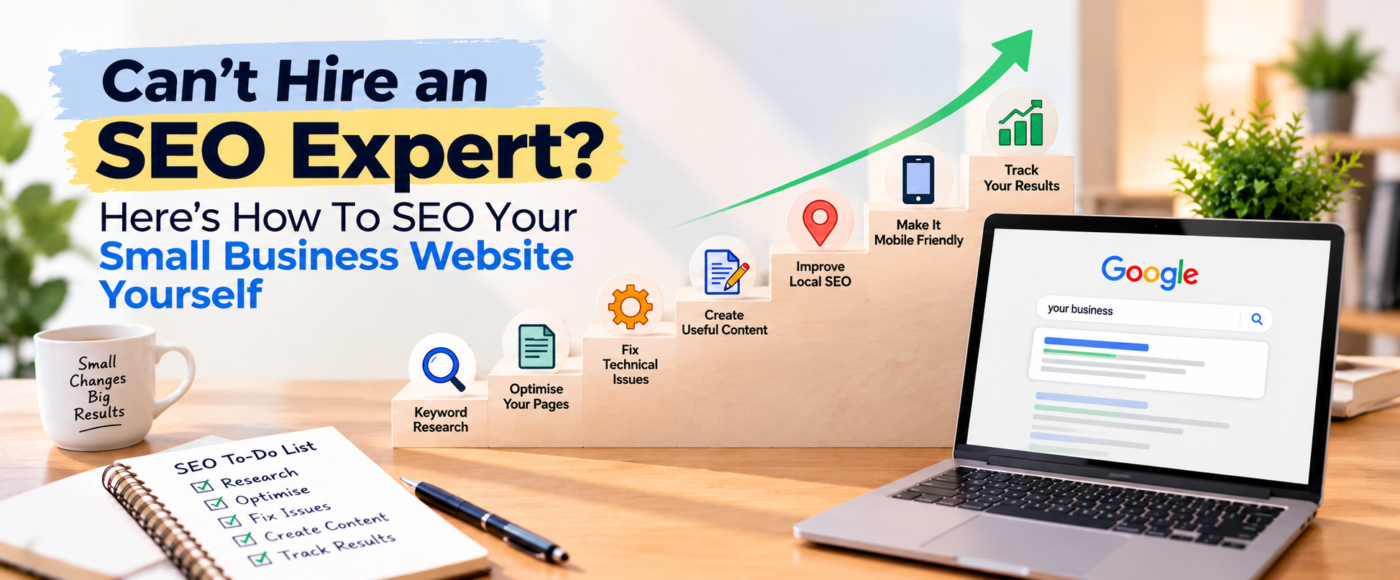
Checking indexing, researching keywords, optimising pages, improving content, fixing technical issues, strengthening internal links and tracking results are all achievable without specialist help. Working through them gradually, page by page, is far more sustainable than attempting everything at once.
That said, deeper issues such as technical SEO problems, strong competition, limited website authority and ongoing optimisation often need more experienced support to resolve properly. DIY SEO is a solid starting point, not a complete long term strategy.
How Step Ahead Digital Can Help
Step Ahead Digital’s SEO team supports UK small businesses that have made a start with DIY SEO but want to go further. This typically includes detailed website audits, keyword and content strategy, technical optimisation, and ongoing monitoring of search performance over time. If you have followed the steps above and want a second opinion on where the biggest opportunities lie, our guide to SEO costs and pricing in the UK is a useful next read before deciding how much support to bring in.
Need expert support to take your website SEO further? Speak to Step Ahead Digital about improving your search visibility.
FAQ
How long does it take to SEO a website yourself?
Most small business owners see initial improvements, such as better indexing and clearer page titles, within a few weeks. Meaningful ranking changes usually take two to six months, since Google needs time to recrawl and reassess updated pages.
Do I need technical skills to do basic SEO?
No. Many of the steps covered here, such as writing clearer titles, researching keywords and improving content, require no coding knowledge. Some technical issues, like server errors or structured data, may eventually need developer support.
Is Google Search Console really free?
Yes. Google Search Console is a free tool provided directly by Google and is one of the most useful resources available for understanding how your website performs in search.
What is the biggest mistake small businesses make with DIY SEO?
Focusing on traffic volume rather than relevance. Attracting visitors who are not genuinely searching for your services rarely leads to enquiries, which is why tracking conversions matters as much as tracking clicks.
When should I hire an SEO expert instead of doing it myself?
Once you have addressed the basics and growth slows, or if you operate in a competitive market with established competitors, professional support can help identify technical issues and authority gaps that are harder to diagnose without specialist tools and experience.